In 2026 you can generate a complete website with AI, and the tools keep getting better. I build sites with them every day and see up close how widely the results vary. Some AI-built sites work fine, others end up costing more time and money than they save. What makes the difference is mostly how you use the tool.
Building a website with AI: your options in 2026
There are roughly three ways to build a website with AI. Which one suits you depends on what you need and how much you want (or can) do yourself. The tools change quickly, so the names below are the state of play as of mid-2026.
Ready-made AI website builders
With Wix, Hostinger, Jimdo and Framer, AI generates the site for you. You answer a few questions about your business, pick a style, and within a minute you have a working site. The entry cost is low (a few euros a month) and you don't need technical knowledge. The flip side is that you're tied to the platform: the design options are limited and you usually can't export or move the site. These are the same trade-offs as when you have a cheap website made.
AI code tools for building it yourself
Bolt.new, Lovable and v0.dev generate working code from a description in plain language. Lovable shows how popular this is: according to Bloomberg, the company reached $200 million in annual recurring revenue in November 2025. You get more freedom than with a ready-made builder, but the results vary a lot. Without basic technical knowledge, it's hard to judge whether what the AI builds is any good.
Professional AI tools
Do you have experience with web development? Then tools like Claude Code, Cursor, GitHub Copilot, Codex, Windsurf and Antigravity are interesting. With those tools, AI is an assistant in a professional build process: you decide how the code is structured, the AI writes it, and you review and steer. That gets you the best results, but without technical knowledge you won't get far with it.
I work with Claude Code myself. On top of it I've built my own web design system, with fixed ground rules for design, structure and SEO that apply to every site I build. I keep the details to myself, but the principle behind it works just as well if you start with Wix or Lovable. Further down you'll read how to go about that yourself.
The problem with “build me a nice website”
The promise sounds good: describe your business, and AI builds your site. In reality that produces predictable problems. A good website takes more than a description of your business, however good the tool is.
Without a clear plan you get a design that looks like thousands of other AI sites, with copy that stays on the surface and pages that stand apart from each other. And the AI makes technical choices you run into later, as soon as you want to expand or change something.
Take a painter who built his website with Lovable. At first glance it looked fine. When I looked at it, the site turned out to be slow, with generic copy, no SEO foundation and a messy structure. I ended up spending 10 hours to make it workable, and even then it wasn't where it needed to be. Those 10 hours would have been better spent on a site that was set up properly from the start.
Professional knowledge alone isn't enough either. A web designer I work with, someone who has been building clean WordPress sites for years, asked me this spring to rebuild his own site with AI. He couldn't figure it out himself: what he got out of the tools stayed generic and messy, however well he knows his trade. I now build websites for his clients too. So his craftsmanship isn't the problem. Building with AI is a working method of its own, and you only learn it by putting a great many hours into it.
You see this more broadly too. According to research from Stack Overflow (January 2026), AI code without human oversight leads to far more technical debt: mess in the code that you still have to clean up later. The first version works, then the problems pile up.
Check the first version
What AI generates is a first draft. After that the work begins: adjusting and testing, and repeating that until every page is right. If you skip those rounds, you end up with a site that looks neat but does little.
How to use AI wisely for your website
AI works best as a speed-up of a process you understand yourself. Below are five things you can do for that.
Make a plan first
If you start right away with “make a website for my business”, you get a generic result. First think about your audience, which pages you need and what each page has to deliver. Then the AI has something to work with: everything you settle up front is something it doesn't have to guess. That goes for every tool, whether you're working in Wix or with Claude Code.
Set your ground rules
Decide up front which colors, fonts and tone you use, and which elements appear on every page. Then the AI sticks to them. Without those ground rules you get a different style with every new page or section, and your site feels like a patchwork.
Work step by step
Don't build your whole site in one prompt. Work section by section: check each part, give feedback on what isn't right and have it adjusted until it is. That takes more time than “generate everything at once”, but you see the mistakes while they're still small.
Stay at the wheel yourself
The AI makes suggestions, writes copy and builds pages. What counts as good enough is up to you: whether a text is accurate and fits your business, whether a page works on your phone, whether the structure is logical and the page loads fast enough. Without that check, more mistakes creep in at every step.
Know your limits
This is perhaps the most important point. AI helps you most when you know what a good site looks like, because then you can judge whether the design is right, whether the code is clean and whether the SEO strategy holds up. If you lack that knowledge, your site probably lacks it too. In that case, get help with exactly the part you can't judge yourself.
What does the result depend on?
Whether you end up with a good website using AI depends mainly on three things.
- What the site has to do. A site that only has to be online is different from a site that has to bring in clients. A site for a plumber or construction company that has to be found in its own region takes more than a standard template. Then you also put more time into the plan and the review.
- How much you put in yourself. Planning, building section by section and going through everything critically takes hours. Those hours largely determine what your site delivers in the end.
- What you can judge yourself. If you understand design, the technical side, findability and conversion (how many visitors get in touch), you can steer the AI more precisely. You also see sooner when something isn't good enough.
If you have the time and the knowledge to do that carefully, you can build a perfectly good website with AI. If not, you risk paying twice: first for the AI tool, then for someone to fix the site.
Launching an AI website: check these points first
However you build your site, go through these points before you launch:

- Can you leave your platform? Some builders (Wix, Hostinger, Durable) don't let you export your site. If you want to switch later, you start over.
- Is the SEO foundation there? Meta titles and descriptions per page, an XML sitemap, robots.txt and a logical URL structure. Test it with the free SEO checker.
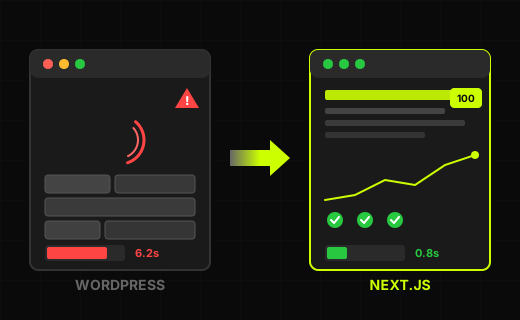
- Does your site load fast enough? Test with the free website speed test. AI-generated sites often load too slowly because of unnecessary code.
- Does it work on a phone? A large share of your visitors come via mobile, so test your site on your own phone.
- Can Google crawl your site? Many AI tools build sites that run entirely on JavaScript. Without server-side rendering (SSR), where the server delivers every page ready-made, a crawler first sees an empty page. Google then has to render the page separately, and many AI search engines don't. Your site then shows up in search results later, incompletely or not at all.
- Is it secure? Check whether your site runs on HTTPS, whether your forms are protected against spam and abuse, and whether connections with other services are properly secured. AI-generated code often contains security holes.
- Is your content unique? AI copy is often superficial and could just as well have been on a competitor's site. Read your copy through: is there something in it that is only about your business, like your way of working or a job you did? The free AI checker shows which sentences still sound like AI.
Build it yourself or have it made?
With AI, building a website has become easy. That's good news if you want to get online quickly without immediately spending thousands of euros.
But a good site doesn't come with it automatically. A website that brings in clients starts with a plan and is then improved further and further, whichever tool you use. In the complete guide to making a website you can read everything that involves. Want to build it yourself and leave the SEO to someone else? Then read what outsourcing SEO costs and delivers.
Rather have a website that gets it right the first time?
Then I'll build it for you, with the system based on Claude Code that I told you about earlier in this article. Your site will be fast and built so that Google can read it well. Call: +31 6 282 064 10. Or schedule a call.
SCHEDULE A CALL